NS - Knowledgebase
Find the answers you need. More articles every week.
| ID | Title | Module | Category | ||||||||||||
|---|---|---|---|---|---|---|---|---|---|---|---|---|---|---|---|
| 62 |
Why a User Cannot Log InWhy a User Cannot Log InProblem A member of staff cannot sign in. The password is refused, the account says it is locked, or they are asked for a code they cannot produce. Background Signing in has two steps, and they fail differently. First the practice is identified, then the person is. Several separate controls sit on the second step - the password, the account lock, multi-factor authentication and, if the practice uses it, IP restriction. Working out which one has stopped them is most of the job. Resolution Work through these in order.
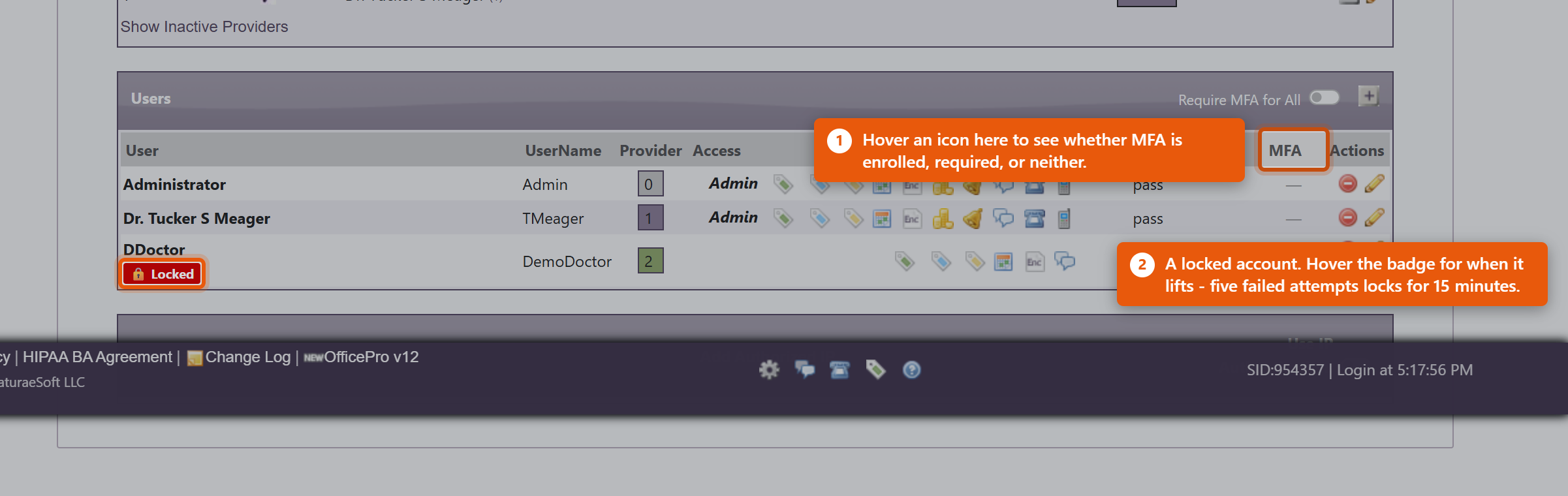 If the whole practice is locked out and IP authentication is on, the practice address has most likely changed - after a power cut or a router restart. Nobody inside can correct it, because the Admin page sits behind the same check. Contact NaturaeSoft support. A note on shared logins. If the answer keeps being that several people use one account, fix that instead. Each person needs their own login: shared accounts make the audit trail meaningless, and one person changing the password locks out everyone else. |
 |
|||||||||||||
| 66 |
Sales Tax on an Order Looks WrongSales Tax on an Order Looks WrongProblem A line was taxed at a rate nobody expected - too much, too little, or nothing at all - or two similar orders came out taxed differently. Background The rate on a line is not read live from your settings. When the line is created, OfficePro works out the rate from the order's tax group and the product's class, and saves that figure onto the line. The line keeps it from then on. That is deliberate - it is what stops a rate change from silently rewriting last quarter's takings - but it means an old line can legitimately carry a rate that no longer matches your current settings. Two orders taxed differently is often two orders raised either side of a change, not a fault. Resolution Work from the line outwards.
If the Group Rate column disagrees with what was chargedThe Group Rate shown against a group is a stored summary, refreshed only when somebody opens that group and saves it. Charges are always calculated from the jurisdictions in the group, so if the two disagree, the charge is right and the summary is stale. Open the group and save it to bring the display back in line. Correcting a line that really is wrongFix the configuration first, or the next order repeats the error. Existing lines keep their stored rate, so any already-wrong line has to be corrected on the encounter itself. If the period is closed or the return is filed, talk to your accountant before altering it - the fix for a filed period is usually an adjustment, not an edit. |
|
|||||||||||||
| 69 |
A Gift Card Will Not RedeemA Gift Card Will Not RedeemProblem A card is refused at the point of redemption, shows a balance the customer disputes, or reads as zero when it should hold value. Background A card carries three things that can each stop a redemption: its Status, its Balance, and whether the sale that funded it was ever actually paid. Selling a card adds it to a visit as a charge - if that visit was never settled, the card exists but was never paid for. Resolution
Refunding or cancelling a cardUse Cancel / Refund Gift Card and then Cancel Card. Cancelling stops the card being spent; refunding returns the money to the purchaser. Record why in the Note - a cancelled card with no explanation is impossible to account for later. Cancel a card that was sold in error, or one reported lost after you have confirmed who bought it. Because anyone holding the UID can spend the balance, a card reported lost should be cancelled promptly rather than watched. The balance looks wrong in the accounts, not on the cardIf the card itself is right but your figures look wrong, this is usually not a fault. Gift card revenue is recorded when the card is sold, not when it is spent - so a day of heavy redemption shows activity without matching takings, because that money came in when the cards were bought. See Selling and Redeeming Gift Cards. |
|
|||||||||||||
| 71 |
A Report Is Missing or Will Not OpenA Report Is Missing or Will Not OpenProblem A report you used to run is not in the list, a saved link no longer works, or opening one returns a message instead of figures. Background The reports section was rebuilt in August 2026. A registry now decides which reports exist and who may see each one, and roughly 250 old pages were retired down to a registered set. A report can therefore be absent for four quite different reasons, and OfficePro tells you which - read the message rather than the fact that it failed, because the fix is different each time. Resolution "That report does not exist. It may have been renamed or retired." The report is gone, and this is almost always an old bookmark or a link in a document. Most retired reports were duplicates of one that survived, so look for the current equivalent in the list on the left and bookmark that instead. Search the Find a report... box for a word from the old title - the replacement is often named slightly differently. "Your account does not have access to this report." The report exists and your user account is not permitted to open it. Most financial reports need financial access; the Data Error Review needs administrator access. An administrator can grant it from Edit User on the Admin page. Note that an access box left blank counts as not granted, so a newer account can reach the reports list and still see very little in it. "This report belongs to a module this practice does not currently license." The report is part of a module the practice does not subscribe to - the product and refill reports need ProductPro, the Billing Report needs BillPro. No permission change will open it; the practice would need to add the module. Contact NaturaeSoft if you think you already have it. "This report is not included in your plan." The report exists and is licensed but sits outside your current plan. Again, not a permission - contact NaturaeSoft to discuss the plan. The report opens but is emptyCheck the period before anything else. Most reports open on the current month, so early in the month they can be legitimately near-empty. Widen it to last month or this year and see whether the figures appear. If a report has no period bar, it is a point-in-time report - Patients with a Balance Due, Subscription Health and the duplicate-finding reports describe how things stand now. Empty means there is genuinely nothing to show, which is usually good news. A provider cannot see other providersThat is intended. A provider is restricted to their own figures; selecting a different provider requires financial or administrator access. Two people see different report listsAlso intended. A group only appears when the account has access to something within it, so the list reflects permissions. Compare the two accounts under Edit User. The numbers look wrong rather than missingFollow the figure to its source rather than comparing totals between reports. Click through from the Practice Dashboard, step down through the Master Reports from Summary to Detailed, or open Sales Tax - Line Detail from the Sales Tax report to see every line behind the total. Two reports disagreeing usually means they are counting different things over different periods, and the drill-down is what shows you which. |
|
|||||||||||||
| 73 |
A Payment Is Not Allocated CorrectlyA Payment Is Not Allocated CorrectlyProblem A patient who has paid still shows a balance, a payment shows as over allocated, or a credit has disappeared. Background Taking a payment and applying it to a visit are separate steps. Money can be correctly recorded and still not attached to anything, in which case the patient looks like they owe it. Most allocation problems are this, not a lost payment. Resolution
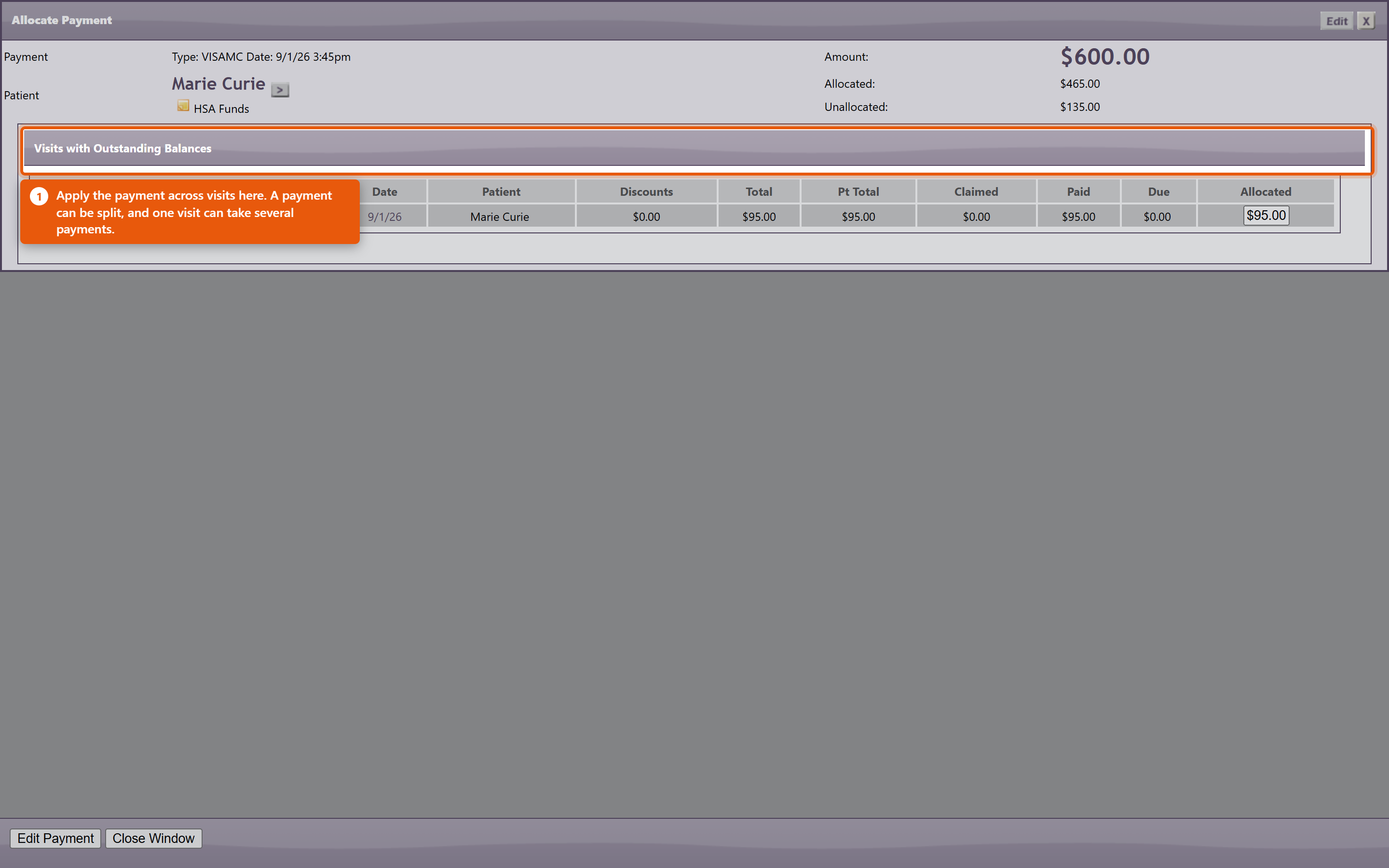 The patient says they paid and there is no record at allSearch the patient's payments before assuming it was missed - a payment entered against the wrong patient or the wrong visit is far more common than one that was never entered. Check the same day's takings for an amount that matches. If it was taken by card, the approval or auth number on the terminal receipt is what ties it to the entry, which is why recording it at the time matters. Preventing most of this
|
|
|||||||||||||
| 80 |
A Bulk Message Has Not Gone OutA Bulk Message Has Not Gone OutProblem A campaign was sent and nothing has arrived, progress is stuck at zero, or it reached far fewer people than expected. Background Campaigns are queued rather than sent as you press the button, and a background process drains that queue only during the practice's send window. So a campaign that has not gone out is usually waiting rather than broken - and the screen looks identical either way. Resolution
It went to the wrong peopleNothing can be recalled once sent. Work out which tag produced the audience before sending anything else, or the correction repeats the mistake. Then fix the tagging rather than remembering to work around it next time. A patient asks to stop receiving theseAct on it immediately and remove them from the tags that put them in marketing audiences. This is a legal obligation in most places, not a courtesy, and the software will send exactly what it is told to. Nothing sends at all, for any campaignCheck that bulk sending is enabled for the practice at all, and that the window is not set to a range that never occurs. A window with a start later than its end is the usual culprit. |
|
|||||||||||||
| 10 |
Problems connecting to OfficePro, browser keeps spinning...Problems connecting to OfficePro, browser keeps spinning...You are not able to connect with OfficePro.NaturaeSoft.com or Secure.NaturaeSoft.com.BackgroundThere are many reasons why you may not be able to connect to NaturaeSoft services. It could be the browser, the computer, the firewall, the router, the ISP, or NaturaeSofts, firewall or servers. In order to better address the issue trouble shooting needs to be done to determine the underlying cause of the error. SolutionWhen the servers go down the NaturaeSoft support team is allerted to this through a monitoring service and our teams goes swiftly to work to identify and treat the issue to get your services back running as fast as possible. In most circumstances issues with connectivity to the service are local and do not have to do with NaturaeSoft server / service performance. In most cases of the issue being server related NaturaeSoft's team of engineers can get the the services back up within 15-30 minutes. Most of the time that a NaturaeSoft service does go down it still may be available through an alternative domain. You can access the NaturaeSoft service through either : or In order to troubleshoot the issues with connecting to our servers please follow the path outlined below:
In the event that you cannot connect to the service please try the following things in order:
If the page has an error on it then...
If the page has no error on it, but is just spinning or says cant connect then... (
If you still cannot connect then....
If you can reach another site but still cannot connect to either URL then....
If support confirms our services are down, then...
If NaturaeSoft Servers are up and their status looks good Then (
)
If you still cannot connect
If you still cannot connect
|
|
|||||||||||||
| 21 |
File Uploading LimitationsFile Uploading LimitationsThe OfficePro service allows for the upload of files but there are limitations about the upload service, that you will need to keep in mind. The NaturaeSoft service has 2 limitations. First, we limit all files to 10MB or less, also we only allow 10 minutes per upload of each file this means that you will need to have a certain speed of the internet to achieve the upload of your files upload time depends on two things:
Once you have this info, use the table below to approximate your upload time.
|
|
|||||||||||||
| 36 |
Merging Patient'sMerging Patient'sAccessing the Merge Function:
Selecting the Duplicate Patient:
Reviewing the Merge Preview:
Finding Duplicates in Reports:
Important Note:
|
|
|||||||||||||
| 46 |
Troubleshooting Connectivity Issues with NaturaeSoft ServicesTroubleshooting Connectivity Issues with NaturaeSoft ServicesProblem: You are unable to connect with OfficePro.NaturaeSoft.com or Secure.NaturaeSoft.com. BackgroundThere are several potential reasons for connectivity issues with NaturaeSoft services, including problems with your browser, computer, firewall, router, ISP, or NaturaeSoft’s servers. To effectively address the issue, we need to conduct a systematic troubleshooting process to identify the underlying cause. SolutionWhen our servers experience downtime, the NaturaeSoft support team is alerted through a monitoring service. Our engineers work swiftly to identify and resolve the issue, usually restoring services within 15-30 minutes. Most connectivity issues are often local rather than server-related. Steps to Troubleshoot Connectivity IssuesRefresh the Page:
If the Page Displays an Error:
If the Page is Just Spinning or Indicates It Cannot Connect:
If You Still Cannot Connect:
Check NaturaeSoft Server Status:
If NaturaeSoft Servers Are Up:
If You Still Cannot Connect:
If You Still Cannot Connect:
ConclusionBy following these steps, you can systematically troubleshoot connectivity issues with NaturaeSoft services. If problems persist, please reach out to our support team for further assistance. Thank you for your patience and understanding. |
|