NS - Knowledgebase
Find the answers you need. More articles every week.
| ID | Title | Module | Category |
|---|---|---|---|
| 6 |
Creating a Treatment PlanCreating a Treatment PlanA treatment plan is the document the patient takes away - what to do, what to take, and how. It is built from the encounter, and it prints as a clean patient-facing page rather than as a copy of your clinical note. Open the planOpen the plan from the encounter you are working in. It opens showing the document as the patient will receive it, with the patient's name, the date, you as provider, and a DRAFT watermark across it until it is finished. The list on the left, headed T:// TXPLAN, shows the sections the plan is made of. Which sections exist is set up once for the practice - see Configuring your ChartPro Service. 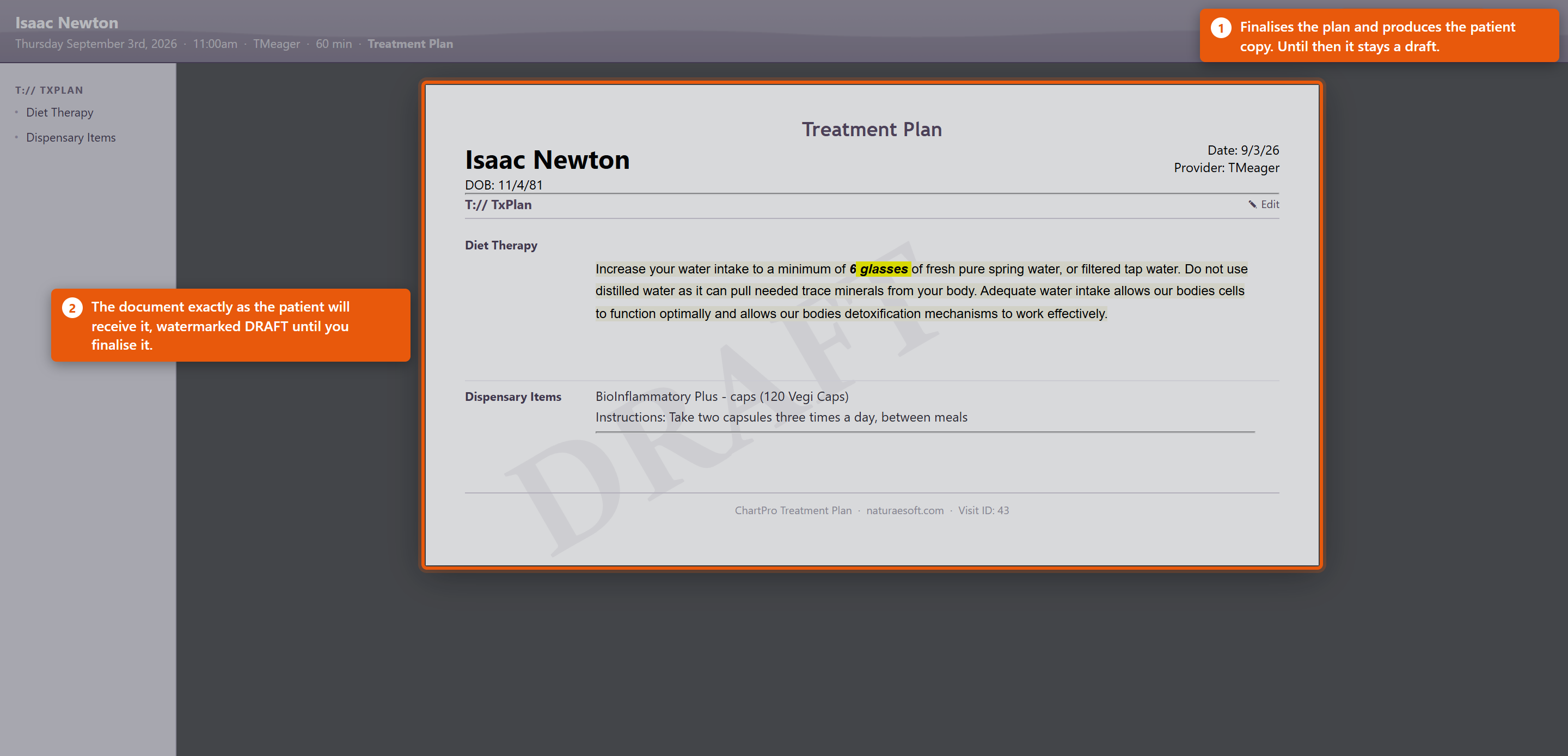 Fill it inEach section has an Edit pencil beside it. Click it, write the content, and it appears in the document straight away, so you are always looking at what the patient will see. Two kinds of section behave differently:
Finish itSave & Document finalises the plan and produces the patient copy. Close leaves it as a draft to come back to. A plan left in draft is not lost, but the patient has nothing - so finish it before the patient leaves rather than intending to come back to it. Making it useful
Dispensary items on the plan are the same products as in your catalogue, so the instructions can come from the product record rather than being typed each time. See Adding and Editing Products. |
 |
|
| 101 |
Dictating a Note with Auto ChartDictating a Note with Auto ChartAuto Chart records a consultation, transcribes it and drafts the chart note. You read the draft and decide whether it goes in. Before you startOpen the note on the right visit - the AI is given that visit's Patient, Provider, Visit Type and Date of Service, and it uses them. Starting from the wrong visit produces a plausible note about the wrong context. Tell the patient what you are doing, in whatever words your practice has agreed. RecordingAuto Chart opens the listener and starts recording; you will hear a tone. The panel shows your use for the month against 40. Things that make the difference between a good draft and a poor one:
Reading the draftWhen it finishes you get AI Note Preview - Review the AI-generated chart note below. Read it properly. Check the numbers against what you remember, check nothing has been attributed to the patient that they did not say, and check nothing has been invented that sounds reasonable. A draft that reads well is not the same as a draft that is right, and once you accept it, it is your note.
Edit the note afterwards exactly as you would any other. The draft is a starting point, not a finished document. Rating a noteRate This Note asks about Transcription Accuracy, AI Note Quality and an Overall score from Poor to Excellent, with Comments, then Submit Rating. It genuinely is read - Your rating helps us improve ChartPro AI. Rate the ones that came out badly and say what was wrong in the comments. Almost nobody rates anything, so a specific complaint carries real weight. Looking back at what it wroteThe review link beside the button opens ChartPro AI - Encounter Review, listing your encounters by Date and Encounter # with their Note Quality, or Not rated. Opening one shows the Transcript next to the ChartPro AI Note. If you ever want to know whether it misheard something or invented it, this is where you find out. |
|
|
| 2 |
Creating your first Chart NoteCreating your first Chart NoteWelcome to ChartPro where you can easily and competently document your encounters with patients with ease. To get started, click on the [C] button in the visit icons area on any visit. The [C] button allows you to access the chart note for a particular visit. To learn more about visit icons and visit workflow click here.
Establish a Patient Visit:
Access the Chart Note:
Navigate to the ChartPro EMR Interface:
The ChartPro interface will load for this visit in a popup window and will put you right into the primary segment of the chart (usually, Subjective > HPI). The charting interface is organized in a compact but robust way to help you document your visits easily, accurately, rapidly, and effectively. To make the most of your charting experience familiarize yourself with the charting environment. Let's start with a description of the interface: Adding Content:
Incorporate Preformatted Content:
Complete Other Segments:
Save Your Note:
Additional Tips:
This guide should help you get started with creating chart notes effectively in OfficePro. |
|