Knowledgebase Article
Connecting Fullscript to OfficePro
Category: Configuration | Module: ProductPro | Created: 9/6/2026 | Last Updated: 10/29/2026
Connecting Fullscript lets you pull their catalogue into your own product list and send patients a Fullscript plan without leaving OfficePro. It is set up once by an administrator, and then each prescribing provider is linked to their own Fullscript account.
Fullscript needs ProductPro. Without that module none of these screens are reachable.
1. Connect the practice
- Open the Admin page and find Add-Ons & Integrations.
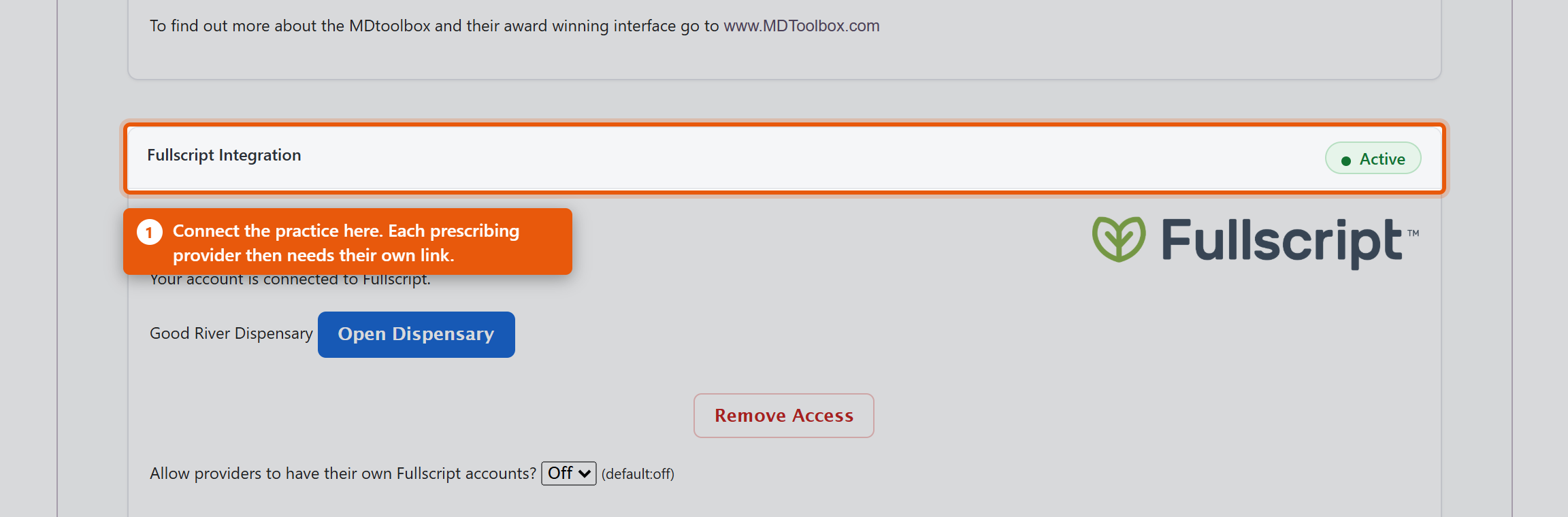
- In Fullscript Integration, click Integrate Fullscript.
- You are taken to Fullscript to sign in and approve the connection, then returned to OfficePro.
When it has worked the section reads Your account is connected to Fullscript. Sign in with the account that owns your clinic's Fullscript dispensary, not a personal one - the connection determines whose catalogue and whose commissions you are working with.
2. Link each provider
Connecting the practice is not enough on its own. Fullscript plans are written by a named prescriber, so each provider needs their own link.
Under Associate Providers with Fullscript you will see each OfficePro Provider against their Fullscript ID. Use Add to Fullscript for anyone not yet linked.
A provider showing Assigned under another account has a Fullscript account already tied to a different dispensary - often their own from a previous practice. That has to be resolved with Fullscript directly; OfficePro cannot move it.
3. Decide how imported products should look
Before importing anything, set the defaults in ProductPro settings. They apply only to products added from the Fullscript catalogue and never change products you already have.
- Default Category - the category imported products land in. Worth setting, or everything arrives uncategorised and your patients cannot browse it.
- Default Product Type - leave it on none to import without a type. Only the values in that list are valid. A type that is not one of them renders a blank Type box on the product form, which is confusing and easy to miss.
- Mark Imported Products Taxable - leave this on unless your practice genuinely does not charge sales tax on supplements. See Sales Tax by Product Class if some are taxed at a reduced rate.
Disconnecting
Remove Access ends the connection, and the section then reads Your Fullscript access was removed. Products already imported stay in your catalogue - they are your products now - but they stop being refreshed from Fullscript and new plans cannot be written until you reconnect.
Check it worked
- The integration reads as connected on the Admin page.
- Every prescribing provider shows a Fullscript ID.
- Open Product Catalog, set Source to Fullscript and run a search - if products come back, the connection is live.