Knowledgebase Article
Configuring your ChartPro Service
Category: Configuration | Module: ChartPro | Created: 10/2/2024 | Last Updated: 9/5/2026
ChartPro is set up once and then largely left alone. The work is deciding what your chart notes should contain and in what order, which is done from ChartPro Administration.
How a note is put together
Three things stack up:
- A section is one of the five parts of a note: Subjective, Objective, Assessment, Plan and TxPlan. These are fixed.
- A segment is a block within a section - History of Present Illness, Past Medical History, Review of Systems. This is where practices differ, and it is what you configure.
- A form is the structured questionnaire a segment can carry, where free text is not enough.
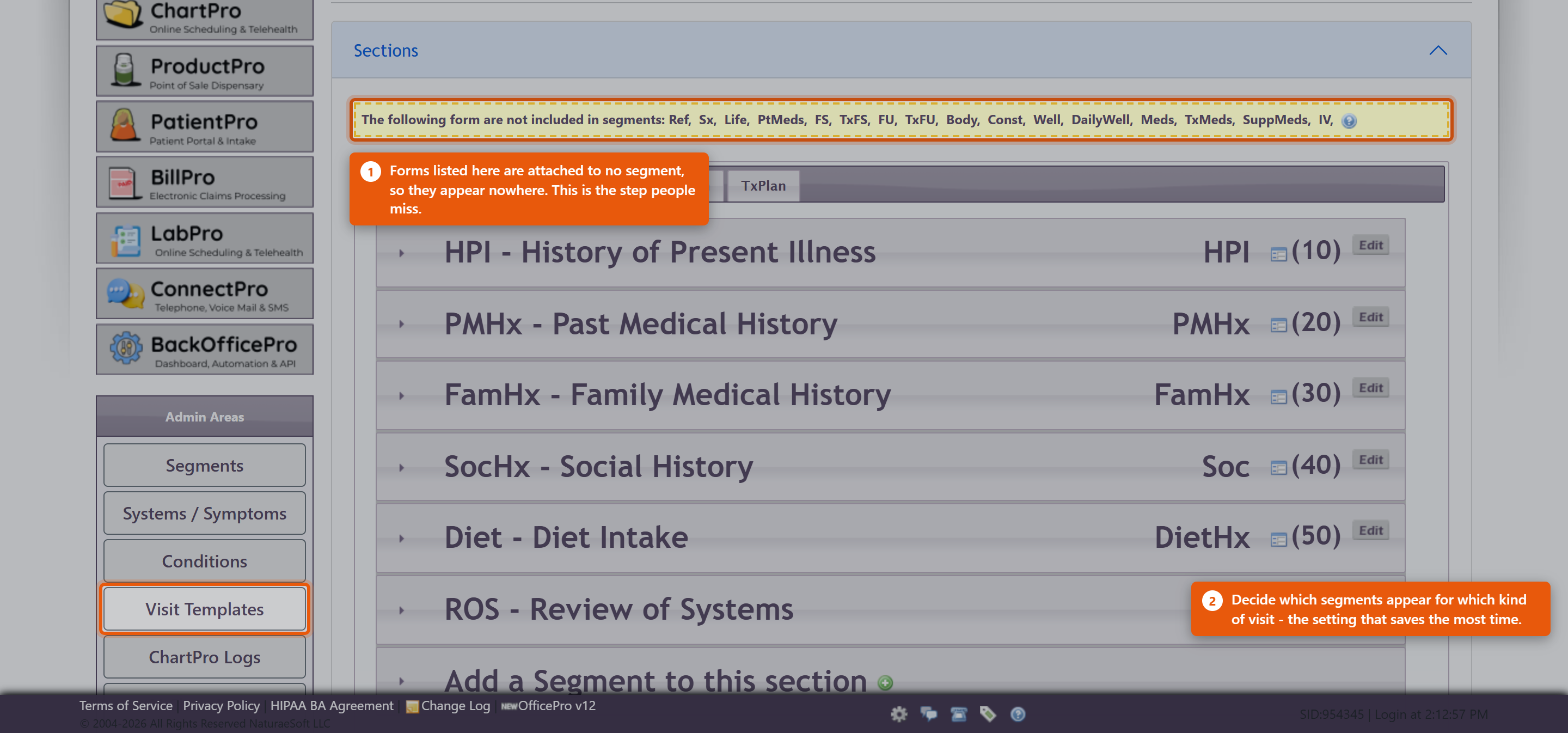
The Sections panel shows the five tabs with their segments beneath. Each segment has a short code and a number setting its position, and an Edit to open it. Add a Segment to this section adds a new one.
Setting up a segment
Edit Segment Details holds the name and description. Two settings matter more than they look:
- Include a Form attaches a structured form to the segment. A form that is not attached to any segment never appears anywhere. The warning box at the top of ChartPro Administration lists every form currently in that position - worth reading, because a form built and never attached looks from the outside exactly like a feature that does not work.
- Intake Filtering shows a segment only for the patients it applies to, by Gender and Life Stage. Used well this keeps notes short; used carelessly it hides a segment from people who needed it, so set it only where the segment is genuinely irrelevant to everyone else.
Add to Templates puts the segment into your visit templates.
The other admin areas
- Visit Templates - which segments appear for which kind of visit. A new patient intake and a ten-minute follow-up should not present the same note, and this is where that is decided. It is the setting that saves the most time day to day.
- Systems / Symptoms - the vocabulary behind the Review of Systems.
- Conditions - the condition list used in assessments.
- ChartPro Logs - a record of chart activity, for when you need to establish who changed what and when.
Getting started
Do not redesign everything before seeing patients. The supplied sections and segments are a working note for most practices.
- Chart a handful of real visits with what you are given.
- Note what you keep skipping and what you keep typing by hand.
- Remove the first, add the second.
- Set up Visit Templates once the note settles.
A note designed in the abstract is almost always longer than the one you end up wanting.
Practices giving IV therapy
The IV form is attached in exactly this way, and it is a common reason the IV panel appears to be missing. Enabling IV therapy in ProductPro settings is only the first step - the form still has to be attached to a segment here. See Setting Up IV Therapy Products.