Knowledgebase Article
Patient Product Orders
Category: Training | Module: ProductPro | Created: 12/8/2025 | Last Updated: 9/6/2026
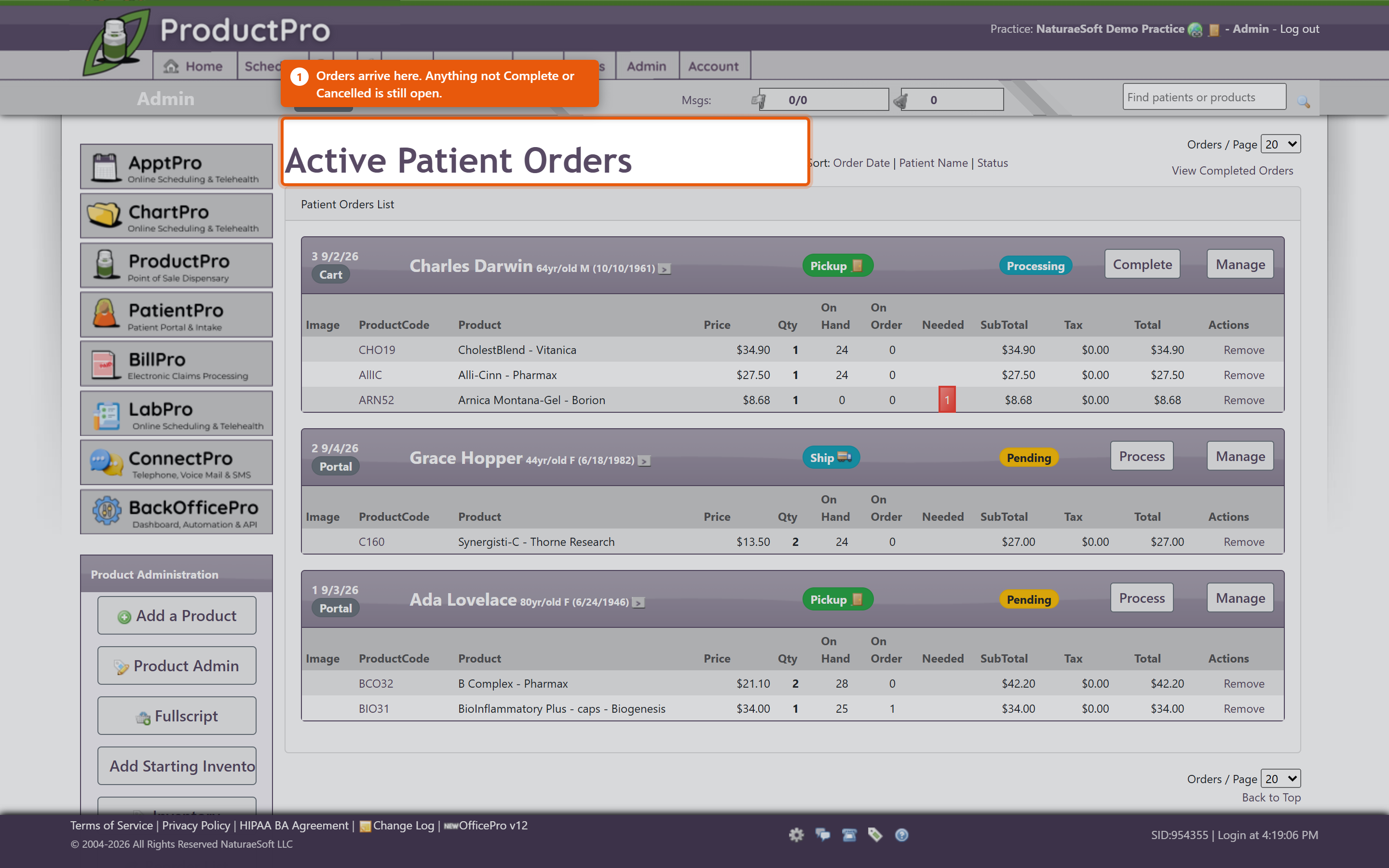
Patients can order products themselves from the PatientPro portal, and those orders arrive in OfficePro for your staff to fill. This covers both halves - what the patient does, and what you do with the order once it lands.
What the patient sees
Your products in the portal lists what has been prescribed or recommended for them, and Products Available Over the Counter lists anything you sell openly. They can search, filter by category, and reorder anything they have had before.
Checkout is a short sequence under Online Check Out:
- Delivery method - Pickup, Standard Delivery or Premium Delivery.
- Delivery details - the address, where it is being sent.
- Payment method - taken against the card already held for them.
They then see Your Order Was Received, and the order appears under Order History with Order Details and Products in this Order: for each one.
The charge is not settled at that point. The patient has authorised it; the money is taken when your staff process the order. This matters, because a patient who cancels before you process has not been charged.
Working orders in OfficePro
Orders arrive in Active Patient Orders. Opening one shows Steps to complete this order - the sequence for that order, which differs depending on whether it is being collected or delivered.
Each product line shows Needed against OnHand, so you can see immediately whether you can fill it. Where you cannot, Order Products puts what is short onto a purchase order.
You do not have to fill an order all at once. Work the lines you can and leave the rest - the order stays open with the remainder outstanding, which is the right answer when one item is on back-order and the patient wants the rest now.
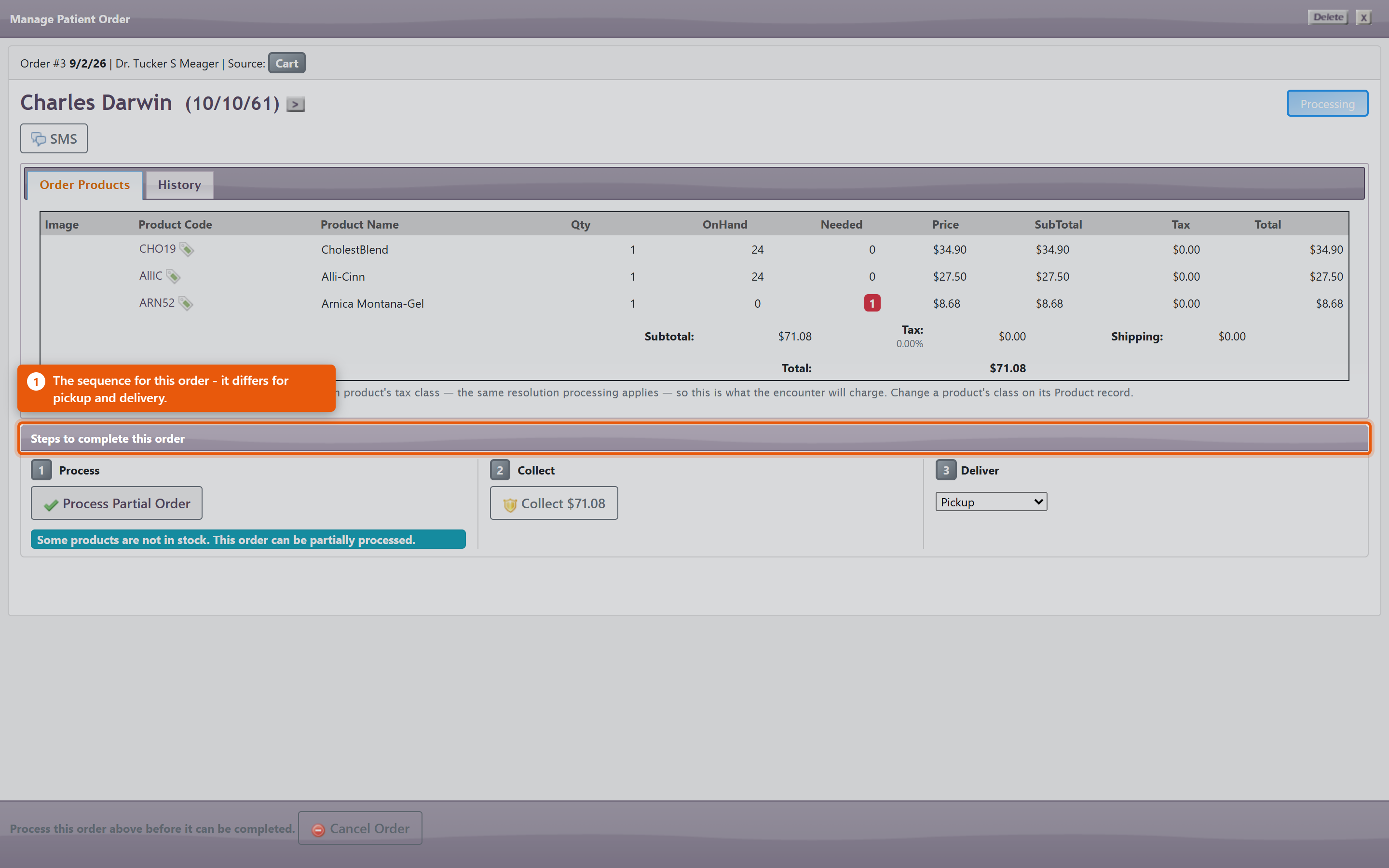
The actions you will use most:
- Process - takes the payment and commits the order.
- Collect and Ready for pickup - for orders being picked up in the clinic.
- Deliver and Shipped, with a Tracking Number - for orders going out.
- Send Text Now and Resend Text - tell the patient it is ready. Worth doing: an order nobody was told about sits on the shelf.
- Apply patient credit - where the patient has credit to put against it.
- Re-sync Products - refreshes the lines against the current catalogue if a price or product has changed since the patient ordered.
Scheduled for completion by shows when the order is expected to be finished, which is what the patient has been told.
Carts that never became orders
Patient Carts shows baskets patients filled and did not check out. These are worth a look - a cart abandoned at the payment step often means a card problem rather than a change of mind, and a phone call recovers the sale.
What ordering does to the rest of the system
- Stock moves when the order is processed, not when the patient places it. Two patients can order the last bottle; the second discovers it at processing.
- Processing creates the visit and charges that carry the sale, so a processed order appears in your takings like any other product sale.
- Tax is worked out at processing from the delivery destination. An order shipped out of area may correctly carry no tax - see Setting Up Sales Tax.
Keeping it working
- Work Active Patient Orders daily. Patients have been told when to expect their order, and nothing chases it for you.
- Tell them when it is ready - use the text rather than assuming they will check the portal.
- Keep the catalogue honest. Patients order from what they see, so a product with no image or a stale price produces orders you then have to correct.
- Check Patient Carts weekly for orders that stalled at payment.