Knowledgebase Article
Selling and Redeeming Gift Cards
Category: Training | Module: OfficePro | Created: 9/5/2026 | Last Updated: 9/23/2026
A gift card holds a balance the practice has already been paid for. You sell one, the customer pays for it like anything else, and the balance is then spent against future visits - by whoever holds the card.
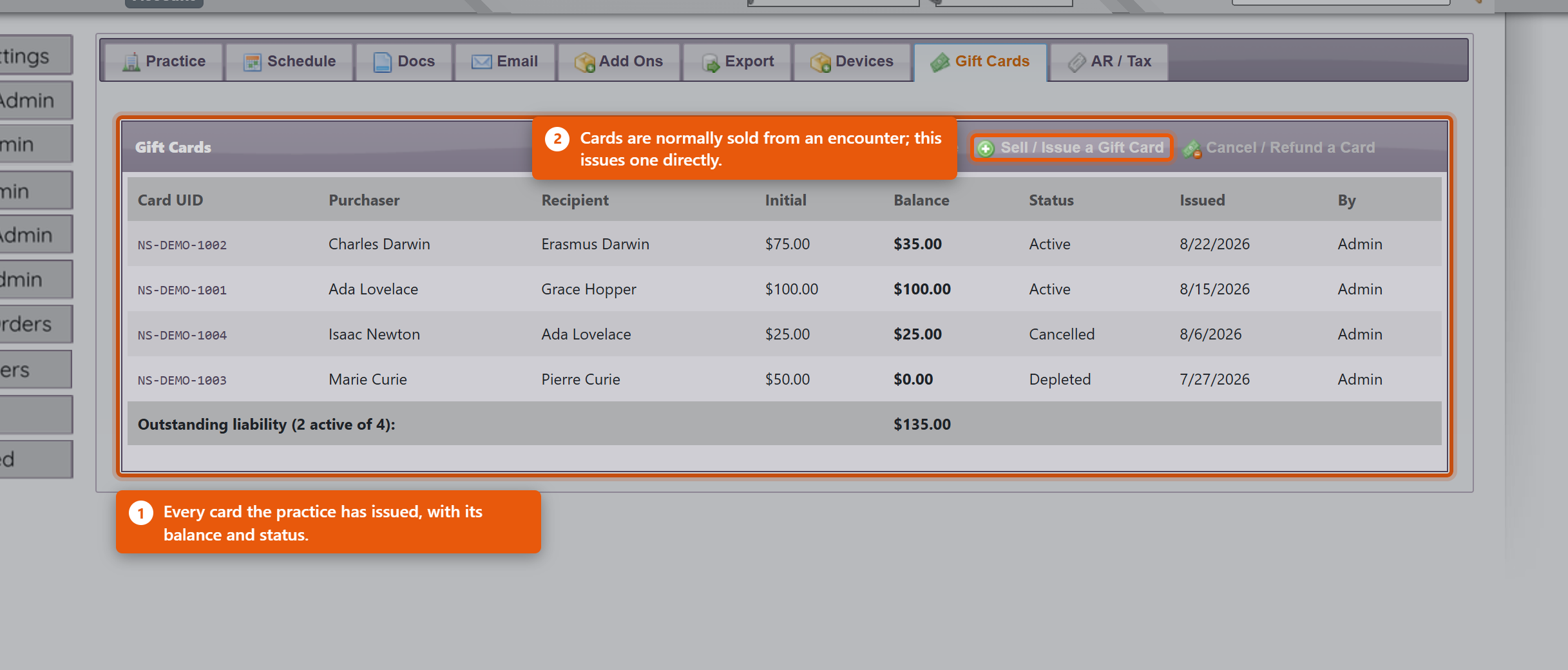
There is nothing to switch on. The tools are on the encounter, on the patient record, and on the Admin page, on the Payments tab under Gift Cards.
Sell or load a card
- Open the encounter for whoever is buying. In the Credits bar, beside Gift Card, click the Sell / load a gift card icon.
- Enter the Load Amount. If the card is a gift, enter the Recipient - that is what makes a lost card traceable later. The patient whose encounter you are on is recorded as the buyer.
- Under Bill to, choose Separate gift-card sale to take payment for the card on its own, or Add to this visit (one combined payment) to put it on today's bill.
- Tap the card on the reader. With no reader, click No reader? Enter card ID manually, type the Card UID and click Use.
- For a separate sale, click the payment method the customer is paying with. For a combined payment, click Add Gift Card to this Visit and take payment with the encounter as usual.
The card is not funded until that payment is taken. Until then it is pending and cannot be spent, and the patient record shows it as awaiting payment.
The same screen loads more value onto a card that already exists - tap or enter the existing card, and the screen shows its current balance and the new balance after the load.
Redeem against a visit
- On the encounter being paid, click the Redeem a gift card icon (the heart) beside Gift Card.
- Tap the card, or use No reader? Enter card ID manually. The Card Balance appears.
- Redeem is filled in with the most the card can pay: its balance, or the Visit Balance if that is smaller. Lower it to take less - a card does not have to be spent all at once.
- Click Apply to Visit.
The amount comes off the visit and off the card together. Anything left stays on the card for next time. A card cannot pay more than the visit owes.
Redeem against the patient's account
When the patient owes money across several visits, or you are not working in an encounter, redeem from the patient's page instead.
- Open the patient. While they have a balance owing, a Gift Card box with a heart icon appears near Add Payment. Click the heart.
- The window shows the patient's Account Balance. Tap or enter the card as above, check the Redeem amount, and click Apply to Account.
- Allocate Payment opens straight away. Spread the redemption across the visits it is paying for.
Do the allocation there and then. The amount comes off the card as soon as you click Apply to Account, but until it is allocated it is not paying any particular visit, and those visits still show as owing.
The heart only appears when the patient owes something, and only for users with payments or administrator access.
Check a balance
On the Payments tab of the Admin page, Check Card Balance reads a card without touching a visit - the right tool when someone rings up to ask what is left. Gift Card Store Value on the patient record shows the cards linked to that patient, and View full transaction history shows every load and redemption with the balance after each.
Where the money appears in your reports
This surprises people, so it is worth understanding once.
The revenue is recorded when the card is sold, not when it is spent. Selling a $100 card puts $100 of revenue in the day it was bought. When that card is later redeemed against a visit, the redemption settles revenue you have already recorded rather than adding more.
So a redemption is not a discount and not a new payment - it is the customer spending money you were already paid. If it added to revenue again, the same $100 would be counted twice: once when bought, once when used.
What this means day to day:
- A day with heavy gift card redemption can show strong visit activity and modest takings. That is correct - the money arrived on the day the cards were sold.
- Selling cards is credited to the clinic. Providers are credited for the services they actually deliver when the card is redeemed. Neither is counted twice.
- An unspent card is money you hold but have not yet given anything for. Practices that track this treat outstanding balances as a liability - the Gift Cards section on the Payments tab of the Admin page lists every card with its Balance and Status.
Practical points
- Record the recipient. A card with no name against it is very hard to help with when it goes missing.
- Cards are bearer instruments - whoever has the UID can spend the balance. Treat a stack of unissued cards like a cash drawer.
- Selling is not funding. If the sale is never paid for, the card stays pending and cannot be spent. Check the sale was settled.